Descheduling with Custom Priority
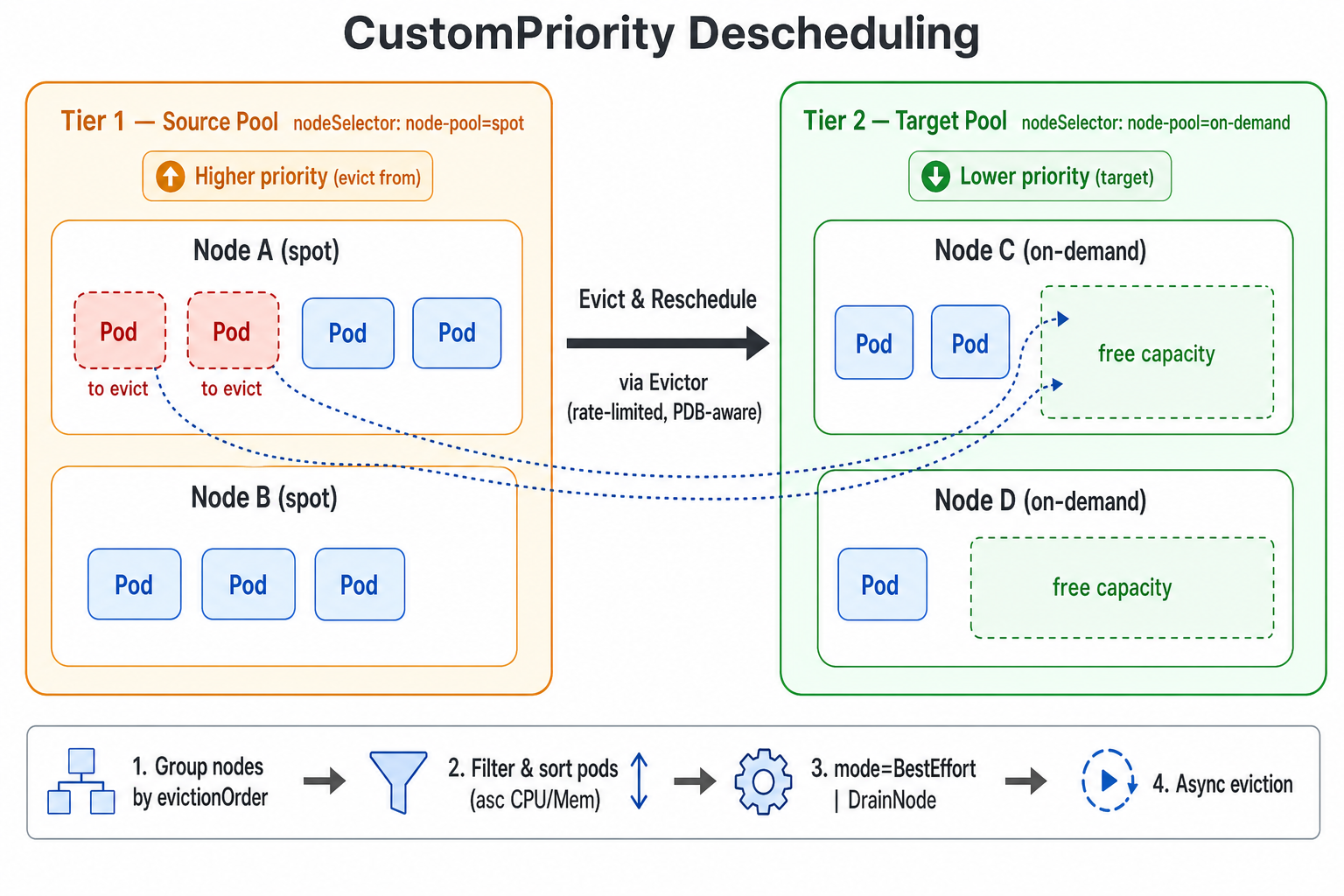
The Koordinator Descheduler ships a CustomPriority plugin that supports descheduling based on a user-defined node priority order. Users can split nodes in the cluster into multiple priority tiers based on business semantics (for example pay-as-you-go vs. pay-by-year-or-month, shared vs. dedicated pools, spot vs. on-demand instances). When the lower-priority (cheaper or more reclaimable) node group has enough capacity to accommodate Pods running on a higher-priority (more expensive or scarcer) node group, the descheduler proactively evicts those Pods from the higher-priority nodes so that they can be rescheduled to the lower-priority nodes. This helps users optimize resource cost, reclaim expensive resources or drain a specific node pool.
Introduction
CustomPriority is a balance plugin in koord-descheduler that decides "who to evict" based on a user-configured node priority order.
Typical use cases:
- Cost optimization: for example, migrate workloads from pay-as-you-go nodes onto pay-by-year-or-month nodes.
- Resource consolidation: gradually shift load from one type of node to another so that the source nodes can be safely scaled down, maintained or returned.
- Tiered pools: enforce a strict ordering between multiple node pools and let workloads "sink" toward the lower tiers over time.
Each descheduling cycle, the CustomPriority plugin executes the following steps:
- Group all nodes in the cluster according to the order defined in
evictionOrder. A node is assigned to the first matching priority tier only. - Starting from the highest-priority tier (the one listed first in
evictionOrder), use it as the source pool and treat all subsequent (lower-priority) tiers together as the target pool candidates. - For every Pod on a source node, apply the namespace /
podSelector/ Evictor filters, and sort the candidate Pods to be evicted by ascending CPU and Memory request. - Run the eviction strategy according to
mode:BestEffort(default): evict any individual Pod as soon as a single target node can accommodate it.DrainNode: evict Pods on a source node only when all candidate Pods on that node can be placed onto target-pool nodes; otherwise the source node is skipped entirely.
- Actual Pod eviction is performed asynchronously by the
Evictor, which honors allEvictorrate-limit and other safety mechanisms.
Use Custom Priority Descheduling
Global Configuration via plugin args
CustomPriority is disabled by default. You can modify the ConfigMap koord-descheduler-config to enable the plugin and provide the priority configuration. New configurations will take effect after the koord-descheduler restarts.
The minimal example below splits nodes into two tiers (spot and on-demand) and continuously moves Pods from spot nodes back to on-demand nodes. Adjust the order to fit your scenario — earlier entries are eviction sources and later entries are target candidates.
apiVersion: v1
kind: ConfigMap
metadata:
  name: koord-descheduler-config
  namespace: koordinator-system
data:
  koord-descheduler-config: |
    apiVersion: descheduler/v1alpha2
    kind: DeschedulerConfiguration
    enableContentionProfiling: true
    enableProfiling: true
    healthzBindAddress: 0.0.0.0:10251
    metricsBindAddress: 0.0.0.0:10251
    leaderElection:
      resourceLock: leases
      resourceName: koord-descheduler
      resourceNamespace: koordinator-system
    deschedulingInterval: 60s
    dryRun: false
    profiles:
      - name: koord-descheduler
        plugins:
          deschedule:
            disabled:
              - name: "*"
          evict:
            disabled:
              - name: "*"
            enabled:
              - name: MigrationController
          balance:
            enabled:
              - name: CustomPriority # Configure to enable the CustomPriority plugin
        pluginConfig:
          - name: MigrationController
            args:
              apiVersion: descheduler/v1alpha2
              kind: MigrationControllerArgs
              evictionPolicy: Eviction
              namespaces:
                exclude:
                  - kube-system
                  - koordinator-system
          - name: CustomPriority
            args:
              apiVersion: descheduler/v1alpha2
              kind: CustomPriorityArgs
              evictableNamespaces:
                exclude:
                  - kube-system
                  - koordinator-system
              nodeFit: true
              mode: BestEffort
              evictionOrder:
                - name: "spot"          # priority name (custom), earlier entry = eviction source
                  nodeSelector:
                    matchLabels:
                      node-pool: "spot"
                - name: "on-demand"     # later entry = target pool candidate
                  nodeSelector:
                    matchLabels:
                      node-pool: "on-demand"
Apply the ConfigMap and restart koord-descheduler so that the new configuration takes effect:
$ kubectl apply -f koord-descheduler-config.yaml

$ kubectl -n koordinator-system rollout restart deploy/koord-descheduler
The full schema of CustomPriorityArgs:
| Field | Description |
|---|---|
| evictableNamespaces | Restricts which namespaces participate in descheduling. If empty, all Pods are eligible. include and exclude are mutually exclusive: include only processes the listed namespaces; exclude ignores the listed namespaces and processes everything else. |
| nodeFit | Whether to perform schedulability pre-check (NodeAffinity, Selector, Toleration, allocatable resources, etc.) before eviction. Defaults to true. |
| evictionOrder | Ordered list of priority tiers. The configured order is the priority order: earlier entries are eviction sources; all later entries together form the target pool candidates. |
| mode | Working mode. Options: BestEffort (default — evaluate and evict Pods one by one) and DrainNode (whole-node drain — only evict a source node when all of its candidate Pods can fit in the target pool). |
| autoCordon | Only effective in mode: DrainNode. When enabled, a node that is determined drainable will be cordoned before its Pods are evicted, preventing new Pods from being scheduled back onto it; the cordon is automatically rolled back if eviction fails. |
CustomPriority requires at least 2 entries in
evictionOrder. With fewer entries the plugin logs an INFO message and exits the cycle without doing anything.
Example
The example below verifies a minimal flow: rescheduling Pods on node-pool=spot nodes onto node-pool=on-demand nodes. The example cluster has two spot nodes and two on-demand nodes.
- Label the nodes (replace with your real node-pool plan):
$ kubectl label node <spot-node-1> node-pool=spot
$ kubectl label node <spot-node-2> node-pool=spot
$ kubectl label node <ondemand-node-1> node-pool=on-demand
$ kubectl label node <ondemand-node-2> node-pool=on-demand
- Create a test Deployment. Make sure it lands on the
spotnodes first (e.g. via NodeAffinity, or by labeling only thespotnodes initially):
apiVersion: apps/v1
kind: Deployment
metadata:
  name: stress-demo
  namespace: default
  labels:
    app: stress-demo
spec:
  replicas: 4
  selector:
    matchLabels:
      app: stress-demo
  template:
    metadata:
      name: stress-demo
      labels:
        app: stress-demo
    spec:
      schedulerName: koord-scheduler
      containers:
        - name: stress
          image: polinux/stress
          command: ["stress"]
          args: ["--cpu", "1", "--vm", "1", "--vm-bytes", "256M", "--timeout", "3600s"]
          resources:
            limits:
              cpu: "1"
              memory: "512Mi"
            requests:
              cpu: "1"
              memory: "512Mi"
$ kubectl create -f stress-demo.yaml
deployment.apps/stress-demo created
- Watch the Pods until they are all Running and confirm they are placed on the
spotnodes.
$ kubectl get pod -o wide -l app=stress-demo
Update
koord-descheduler-configto enable theCustomPriorityplugin (see the Global Configuration via plugin args section above) and restartkoord-descheduler.Observe Pod placement and the descheduling progress.
koord-deschedulerissues migrations throughMigrationController, and you can track each one through thePodMigrationJobCR.
$ kubectl get pod -o wide -l app=stress-demo

$ kubectl get podmigrationjob -A
Expected behavior:
- In
BestEffortmode,stress-demoPods running onspotnodes are evicted one by one and rescheduled ontoon-demandnodes. - In
DrainNodemode, all candidate Pods on aspotnode are evicted only when every one of them can be placed on theon-demandpool. WithautoCordon: truethe drained source node is also cordoned. Source nodes that cannot yet be fully drained are left untouched and remain available for newly scheduled Pods.